The decision starts with the task
A customer message arrives: ‘I was charged twice and cannot sign in.’ Your system needs to understand the request, look up relevant information and prepare a response. That does not automatically require an autonomous agent. You can keep the overall process fixed while asking a language model to interpret the message.
The useful distinction is who chooses the next step. In a workflow, application logic decides the route. In an agent, the model has some authority to choose tools and actions as the task unfolds. Anthropic describes this architectural distinction in its Building effective agents article. Its terminology is useful here; the operational design below is our own worked example, not a reported production result.
Three tasks, three control patterns
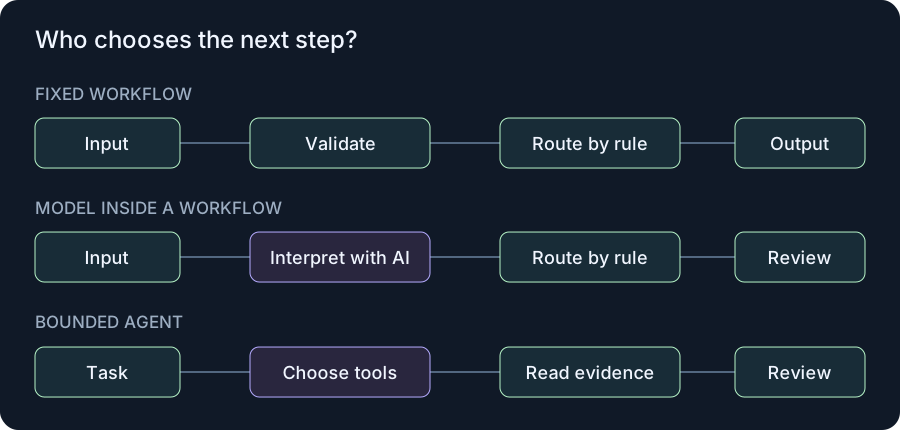
Form validation: check that an email address and project identifier are present, then create a review record. The business rules specify the path, so a standard workflow is sufficient.
Message classification: interpret a free-text support message, return allowed topic labels and follow an explicit route. The model helps with meaning, while application code controls the sequence and permissions.
Document research: choose another approved source when a first source leaves a question unanswered. Bounded agent behavior can help here, provided the available tools, resource budget and review boundary are explicit. These are illustrative tasks, not measured deployment results.
Map the fixed path first
Write the smallest complete process before selecting a framework. For support triage, it might be: receive the message, validate required fields, classify its subject, retrieve an approved help article, create a draft, and put it in a review queue. Each stage has a defined input and an expected output.
Allow a small set of categories such as billing, access and other. A message can contain more than one topic, so decide explicitly whether your schema supports multiple labels. Route missing account references and ambiguous requests to review. A fluent answer is not evidence that a lookup succeeded.
This architecture still uses AI. It simply places AI inside a process whose permissions and completion conditions are controlled by application code. That makes it easier to identify whether a failure came from interpretation, retrieval or delivery.
When an agent becomes useful
Consider an agent when the next useful step depends on information discovered during the task. A research assistant, for example, might inspect a document, notice a missing definition and retrieve a second source. You cannot always enumerate the entire path in advance. The benefit is flexibility; the price is a larger set of possible execution paths.
For our support example, start with a narrow tool set: read a help article and inspect a redacted account-status record. Give the model no refund, password-reset or message-sending capability. Add a proposed action to the review record instead. This separates finding an answer from having permission to execute it.
Define an explicit stop condition: a draft with supporting evidence, a request for missing information, or escalation. Also define a maximum tool-call count and a time budget. Those limits are design choices that should come from your own workload tests.
Compare both designs on the same cases
Create a small evaluation set using synthetic messages before using customer data. Include ordinary billing questions, multiple topics, incomplete identifiers, unsupported languages and messages that try to redirect the assistant. Keep an expected route and an acceptable result for every case.
| Measure | What to record |
|---|---|
| Task completion | Correct draft or justified escalation |
| Unsupported claims | Statements with no retrieved evidence |
| Operational effort | Review time, retries and troubleshooting |
| Resource use | Calls, elapsed time and measured spend |
Run each approach against the same cases and review errors individually. Do not collapse serious permission failures into an average quality score. A design that produces nicer drafts but sometimes bypasses review has failed a different, essential requirement.
A practical starting rule
Begin with the fixed workflow if you can describe the process clearly. Add model-controlled tool selection only where a specific failure shows that the fixed path is too restrictive. Keep the simpler version as a baseline so you can measure what the extra autonomy actually improves.
For a concrete next step, use our human-approval design. If the main problem is unreliable delivery rather than interpretation, work on workflow architecture first. More autonomy will not repair an unclear process.
Sources & verification
Primary documentation reviewed on 8 November 2026. Proposed designs and test procedures are identified in the text. Product interfaces and behavior may vary by version. Validation is guide-specific: documented behavior, proposed designs and any explicitly reported local tests are distinguished in each article. No paid API requests were made.